Tuesday, May 5, 2020

CEH: 10 Hacking Tools For Hackers


There are a lot of hacking tools available over the internet but mostly we need some of them. In this blog you'll learn about hacking tools which are typically used in the world of hacking by penetration testers.

SmartWhois

SmartWhois is an information-gathering program that allows you to find all available information about an IP address, hostname, or domain, including country, state or province, city, name of the network provider, administrator, and technical support contact information. SmartWhois is a graphical version of the basic Whois program.

SocksChain

SocksChain is a tool that gives a hacker the ability to attack through a chain of proxy servers. The main purpose of doing this is to hide the hacker's real IP address and therefore minimize the chance of detection. When a hacker works through several proxy servers in series, it's much harder to locate the hacker. Tracking the attacker's IP address through the logs of several proxy servers is complex and tedious work. If one of the proxy servers' log files is lost or incomplete, the chain is broken, and the hacker's IP address remains anonymous.

NeoTrace, VisualRoute, and VisualLookout

NeoTrace, VisualRoute, and VisualLookout are all packet-tracking tools with a GUI or visual interface. They plot the path the packets travel on a map and can visually identify the locations of routers and other internet working devices. These tools operate similarly to traceroute and perform the same information gathering; however, they provide a visual representation of the results.

Visualware's eMailTrackerPro

Visualware's eMailTrackerPro ( www.emailtrackerpro.com/ ) and MailTracking ( http://mailtracking.com/ ) are tools that allow an ethical hacker to track email messages. When you use these tools to send an email, forward an email, reply to an email, or modify an email, the resulting actions and tracks of the original email are logged. The sender is notified of all actions performed on the tracked email by an automatically generated email.

IPEye

IPEye is a TCP port scanner that can do SYN, FIN, Null, and XMAS scans. It's a command line tool.
IPEye probes the ports on a target system and responds with closed, reject, drop, or open. Closed means there is a computer on the other end, but it doesn't listen at the port. Reject means a firewall is rejecting the connection to the port (sending a reset back). Drop means a firewall is dropping everything to the port, or there is no computer on the other end. Open means some kind of service is listening at the port. These responses help a hacker identify what type of system is responding.

IPSecScan

IPSecScan is a tool that can scan either a single IP address or a range of addresses looking for systems that are IPSec enabled that means the system has IPSec enabled while disabled means that it either has IPSec disabled, the compatibility issue or the configuration issue that not reveal to you that it has IPSec enabled. Indeterminable means that the scanner isn't sure if IPSec is enabled or disabled.

Icmpenum

Icmpenum uses not only ICMP Echo packets to probe networks, but also ICMP Timestamp and ICMP Information packets. Furthermore, it supports spoofing and sniffing for reply packets. Icmpenum is great for scanning networks when the firewall blocks ICMP Echo packets but fails to block Timestamp or Information packets.

SNMP Scanner

SNMP Scanner allows you to scan a range or list of hosts performing ping, DNS, and Simple Network Management Protocol (SNMP) queries. This tool helps you to find out the current information about the device of SNMP nodes in the given network.

hping2 tool

The hping2 tool is notable because it contains a host of other features besides OS fingerprinting such as TCP, User Datagram Protocol (UDP), ICMP, and raw-IP ping protocols, traceroute mode, and the ability to send files between the source and target system.

THC-Scan, PhoneSweep, and TeleSweep

THC-Scan, PhoneSweep, and TeleSweep are tools that identify phone numbers and can dial a target to make a connection with a computer modem. These tools generally work by using a predetermined list of common usernames and passwords in an attempt to gain access to the system. Most remote-access dial-in connections aren't secured with a password or use very rudimentary security.

Related posts


JoomlaScan - Tool To Find The Components Installed In Joomla CMS, Built Out Of The Ashes Of Joomscan


A free and open source software to find the components installed in Joomla CMS, built out of the ashes of Joomscan.

Features
  • Scanning the Joomla CMS sites in search of components/extensions (database of more than 600 components);
  • Locate the browsable folders of component (Index of ...);
  • Locate the components disabled or protected
  • Locate each file useful to identify the version of a components (Readme, Manifest, License, Changelog)
  • Locate the robots.txt file or error_log file
  • Supports HTTP or HTTPS connections
  • Connection timeout

Next Features
  • Locate the version of Joomla CMS
  • Find Module
  • Customized User Agent and Random Agent
  • The user can change the connection timeout
  • A database of vulnerable components

Usage
usage: python joomlascan.py [-h] [-u URL] [-t THREADS] [-v]
optional arguments:
-h, --help              show this help message and exit

-u URL, --url URL The Joomla URL/domain to scan.
-t THREADS, --threads THREADS
The number of threads to use when multi-threading
requests (default: 10).
-v, --version show program's version number and exit

Requirements
  • Python
  • beautifulsoup4 (To install this library from terminal type: $ sudo easy_install beautifulsoup4 or $ sudo pip install beautifulsoup4)

Changelog
  • 2016.12.12 0.5beta > Implementation of the Multi Thread, Updated database from 656 to 686 components, Fix Cosmetics and Minor Fix.
  • 2016.05.20 0.4beta > Find README.md, Find Manifes.xml, Find Index file of Components (Only if descriptive), User Agent and TimeOut on Python Request, Updated database from 587 to 656 components, Fix Cosmetics and Minor Fix.
  • 2016.03.18 0.3beta > Find index file on components directory
  • 2016.03.14 0.2beta > Find administrator components and file Readme, Changelog, License.
  • 2016.02.12 0.1beta > Initial release


Related articles


  1. Hacking Wifi Windows
  2. Como Ser Un Buen Hacker
  3. Computer Hacking
  4. Growth Hacking Que Es
  5. Servicio Hacker
  6. Rom Hacking Pokemon

Evil Limiter: Taking Control Of Your Network Bandwidth


Ever wanted to block someone from the network or limit their bandwidth without having the network admin privileges? Well Evil Limiter has got you covered then.


An amazing tool to help you control your network without having access to the admin panel.

Today I'm gonna show you how to use this interesting tool to take control of your network.


Requirements:

1. A PC or Laptop with Linux OS.
2. A Network Adapter.
3. Access to the Network you want to control.
4. sudo or root access on your Linux OS.

First of all we will download the tool from its github repository:

https://github.com/bitbrute/evillimiter

You can download and extract the zip file from the link above or you can clone evillimiter repository using git like this:


git clone https://github.com/bitbrute/evillimiter 


Now lets install the downloaded tool on our machine

Step 1: Move inside the downloaded github repository

cd evillimiter


Step 2: To install type


sudo python3 setup.py install


wait for the installation to finish (May take some time)


Step 3: To run type


sudo evilimiter


Voila! That's it, you got it up and running on your machine


Now how do you control your network with it, its very easy.

It should detect your network automatically but yeah you can set it up manually as well using the command line argument -i.

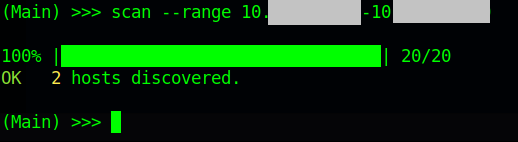
After you have selected the right interface to control, you need to scan your network for live hosts. To perform the scan type


scan


you can pass an optional flag to the scan command which is range which will help you to specify the range of ip addresses you want to scan like this


scan --range 192.168.1.1-192.168.1.100


The above command will scan a total of 100 hosts from 192.168.1.1 to 192.168.1.100


Now after you have scanned your network next thing is to list the hosts that have been discovered during the scan for that you type the hosts command like this


hosts


Now you know the hosts on your network and now you should know which host you wanna block or limit based on the mac address of the host. Remember the host id of the host that you want to block or limit bandwidth of and lets do the magic.

to block a host from using the internet we simply specify the block command followed by the host id of the host that we want to block like this

block 1


if instead of blocking the host we just want to limit his internet bandwidth we can do just that by using the limit command followed by the host id and then the bandwidth that we want to allocate to that particular host like this


limit 1 100kbits


Wohooo! yeah its that easy and yes you can do all this without having the network admin role.

Now if you want to show mercy on that poor guy (blocked host), you can set him free by using the free command followed by the host id like this:

free 1


Well isn't administrating your network bandwidth so easy now.

Hope you enjoyed this tutorial.:)

More articles


  1. Hacker Significado
  2. Ethical Hacking Certification
  3. Viral Hacking
  4. El Hacker Pelicula
  5. Penetration Testing A Hands-On Introduction To Hacking
  6. Google Hacking Database
  7. Hacking Music
  8. Como Aprender A Hackear Desde Cero
  9. Aprender Seguridad Informatica
  10. El Mejor Hacker
  11. Hacking Wifi

Saturday, May 2, 2020

unique domains backlinks

hi there
After checking blogger.com we saw that your ranks and seo metrics can be
drastically improved

If you`ll ever want to improve that with a monthly plan to make your online
business get more visibility, kindly take into consideration our services


For more information please visit our website
https://www.monkeydigital.tk/product/monthly-seo-package/

thanks and regards
Larraine Cavallaro

Friday, May 1, 2020

Gaming In The ATL - 5Th Best In The US

This is a good article highlighting Atlanta as a great place for game play and development.

Status

Too long without a post.

Hopefully this  won't be the last post on the blog. I am still in draft three of a book, and don't seem to be getting much writing done or even seeing many movie. Distractions and all.

I still have an unfinished story. An unfinished book of parsha shiurim. Several half-baked and nearly baked game designs on the shelf.

However, I am still employed, having a social life, going on a vacation next month. My daughter is married and thriving, my son is thriving, too. Which is all good.

Still have weekly game nights and still get new games occasionally. I just got Concordia, Sushi Go Party, and I am expecting Gentes Deluxe and Haithabu. I am expecting a few thousand new Magic cards soon.

I and my boss have been playing games with three non-gamer coworkers at work every Thursday. It's been half a year, and, aside from Codenames, we have rarely repeated any games. Looks like we may start soon.

The magic of games, those little points, seem insignificant, but it's astonishing how they take a play activity and make people focus on a goal, a start, and an end. It's almost hard to understand why, but it must have something to do with: not only feeling great when you succeed, but wanting others to have a chance to feel great, too. If it didn't, the whole concept of multiplayer games would just fall apart. As long as we still play games together, I think humanity still has hope.

Peace.